Baby Shark Pizza Game for Kids
3.269.00Reviews
Analysis ByAppCompare
Cooking with a familiar character can make a short learning activity feel less like a lesson, and that is the main appeal I found in Baby Shark Pizza Game for Kids. This free educational app from The Pinkfong Company turns pizza and pasta preparation into a simple play session aimed at young children. I would describe it as an easy, colorful introduction to following steps, making choices, and completing a small task on a phone or tablet.
The central idea is straightforward: children prepare food and deliver it while Baby Shark provides the theme and motivation. It is not trying to replace a reading course, a structured preschool curriculum, or a more advanced cooking simulator. Instead, it works best as a brief activity for a child who enjoys tapping through familiar routines and seeing an immediate result.
My overall impression is positive but measured. The app is approachable, visually inviting, and suitable for Everyone, yet its appeal depends heavily on whether a child enjoys the Baby Shark setting. I also think parents should pay attention to the way connectivity and in-app purchases can affect the experience, especially when the app is used on a shared mobile device.
How the cooking activity feels in everyday use
A gentle first step into task-based play
The strongest part of the experience is the way it breaks cooking into small actions. A child does not need to understand a complicated menu or remember a long sequence before starting. The pizza-and-pasta theme gives the activity an obvious purpose, while the character-led presentation makes each step feel like part of a little story rather than a worksheet.
I can easily imagine using it after school, during a quiet moment before dinner, or while waiting in a place where a short distraction is useful. A child can focus on selecting ingredients, preparing an order, and moving toward delivery without needing much explanation from an adult. That makes it more accessible than many educational apps that assume a child can already read instructions independently.
There is also a useful everyday connection here. When a child watches food being prepared in the app and then sees pizza or pasta at home, the digital activity can become a conversation starter about ingredients, sequence, and waiting for an order to be ready. I would not call that a formal teaching method, but it gives parents an easy way to extend the play beyond the screen.
What children may learn without feeling tested
The educational value is subtle rather than academic. The app encourages attention, hand-eye coordination, recognition of objects, and the idea that a finished result comes from several connected actions. Those are modest goals, but they are appropriate for a casual children’s app.
I especially like the potential for practicing completion. Young children often jump between activities, so a cooking order offers a beginning, middle, and end. Preparing something, finishing it, and sending it out can help a child experience a simple workflow. Parents can make that benefit clearer by asking the child to describe what happened first and what came next after the play session.
At the same time, I would not expect deep language development, serious numeracy practice, or open-ended creative cooking. The app’s learning comes from interaction and repetition, not from detailed explanations. A child who wants to invent recipes, decorate freely, or explore a broad set of educational subjects may outgrow it quickly.
Why the Baby Shark theme matters
The Baby Shark identity is not just decoration. For children who already recognize the character, it lowers the barrier to trying the activity. A familiar face can make a new app feel safe and understandable, particularly for a preschooler who is still learning how to navigate touch controls.
That same focus can be a limitation. If a child is tired of Baby Shark, the cooking concept alone may not hold attention for long. In that situation, a neutral cooking app or a broader pretend-play game could be a better choice because the child would not be tied to one character world.
The developer, The Pinkfong Company, clearly places the app within its wider children’s entertainment style, and that gives the presentation a consistent identity. I found the theme easy to understand, but parents should judge the app by the child’s actual interest rather than by the popularity of the character.
Playing in different mobile contexts
This is the kind of app that fits naturally on a phone during a short wait, but a larger tablet can make the touch activity more comfortable for smaller hands. On a phone, I would keep the session brief and stay nearby, since young children can tap quickly and may move away from the intended activity.
A tablet shared with siblings creates a different situation. One child may want to complete every order carefully, while another may tap ahead or take over. If the goal is calm, focused play, giving one child a defined turn works better than treating it as a group game. The app is more suited to individual interaction than to cooperative play between several children.
For travel, I would test the complete experience before leaving home rather than assuming every part will behave the same way without a connection. The app may be convenient for a journey, but I would not build a travel plan around unverified offline behavior. A parent who needs a guaranteed no-network activity should choose an app specifically documented for that purpose.
What happens when connectivity becomes part of the experience
Network access can matter at several points in a mobile app’s life, even when the child is focused only on cooking. Installation, updates, account or purchase handling, and some content delivery can depend on the device’s connection or store services. That means a parent may notice a difference between opening the app at home and using it during a weak-signal trip.
I would handle this practically. Open the app while connected, let it finish any visible setup, and check the parts you expect the child to use before handing over the phone. This is not a guarantee that every feature will work without a network; it is simply a sensible way to avoid discovering a connection problem in the middle of a child’s activity.
A connection issue can also be confusing for a young user because the child may interpret a delay as a mistake in the cooking game. If something stops responding, I would first check whether the device has a stable connection, then close and reopen the app if appropriate, and only afterward assume the child has done something wrong. That small distinction prevents unnecessary frustration.
Recovering from interruptions and accidental taps
Children rarely use a phone as carefully as adults do. They may lock the screen, switch applications, press a system control, or hand the device to a parent halfway through an order. For that reason, I would treat the app as a short-session activity rather than a long project that must be preserved perfectly.
Before starting, it helps to close unrelated apps and put the device in a comfortable position. I would also keep the child’s session within sight, particularly if the phone is used for other family services. If the game returns to an earlier point after an interruption, turning that into a quick restart is usually less stressful than trying to reconstruct exactly what happened.
Another useful habit is to let the child finish one small activity before switching away. This supports the app’s natural beginning-to-end rhythm and reduces the chance that a half-completed order becomes a source of confusion. It also makes the experience easier to stop when the child has had enough screen time.
Data-conscious use on a family device
Because this is a children’s app, I would install and configure it as the adult rather than handing the entire setup process to a child. The app is free to download, but it includes in-app purchases ranging from $7.99 to $107.88 per item. That wide range makes purchase controls especially important on a shared device.
The safest routine is to review the store and device purchase settings before play begins, keep payment approval with an adult, and avoid letting a child explore purchase screens unsupervised. The child may understand that a new item looks interesting without understanding that it can involve real money. This is a household-management issue as much as an app issue.
Data use is another reason to prepare at home. If mobile data is limited, I would update and open the app over Wi-Fi before a trip, then observe whether the activity behaves as expected. I would not assume that a colorful children’s game uses no data simply because the gameplay looks simple. Checking the device’s own data controls is more reliable than guessing from the appearance of the app.
Parents should also remember that a free app can still create friction through updates, store prompts, or purchase-related interruptions. Those moments are easier to manage when an adult has already explored the app and knows what the child is likely to encounter. A few minutes of preparation can make the session feel much smoother.
Performance expectations and device fit
The app supports devices running Android 7.1 or later, which gives it a broad range of compatibility among older Android phones and tablets. Even so, compatibility is not the same as comfort. A device may meet the operating-system requirement while still having a small screen, limited storage, or reduced responsiveness that makes tapping less pleasant.
I would choose the largest practical screen available, keep the device charged, and avoid starting a session when the phone is already struggling with many open applications. For a young child, delayed touch response can look like a failure to follow instructions, so smooth basic operation matters more than advanced hardware specifications.
The current version is 1.69, and keeping an app updated can help with general stability and store compatibility. However, updates may also require a connection and can arrive at inconvenient times. I prefer to handle them before the child’s planned play window rather than waiting until the app is needed.
How it compares with ordinary alternatives
Compared with a standard educational game focused on letters, numbers, or puzzles, this app is more imaginative and routine-based. It gives a child a pretend job to perform instead of presenting a direct academic exercise. That makes it a better fit for a child who resists formal learning screens but enjoys role-play.
Compared with a general cooking simulator, it is likely to feel more approachable for younger children because the Baby Shark theme provides an immediate emotional hook. The trade-off is depth. A more advanced cooking game may offer broader recipes, more detailed timing, or more freedom to experiment, while this app is easier to enter but less likely to satisfy an older child seeking complexity.
Compared with a video, the app asks the child to make choices and complete actions rather than simply watch. That is a meaningful advantage when the goal is active participation. Still, a video may be easier during a very short quiet period, while this app works best when the child has enough time and attention to interact with it.
Who will get the most from it
I would recommend it to families with a young child who already likes Baby Shark and enjoys pretend cooking. It is particularly suitable when a parent wants a simple activity that can be explained quickly, used in short sessions, and connected to everyday conversations about food and routines.
It is less suitable for children who need a strong academic progression, older players who want strategic cooking mechanics, or families looking for a fully offline experience that has been explicitly guaranteed. I would also skip it if the child is likely to press purchase prompts or switch between apps without adult supervision.
The rating sits at a 3.2 average from around 1.8 thousand ratings, with 69 written reviews, while the app has passed one million installs. I read those figures as a sign of broad visibility but mixed satisfaction rather than automatic proof that it will suit every child. The best predictor is still the child’s interest in the character and the parent’s willingness to manage the surrounding mobile details.
My final view on the connected play experience
Baby Shark Pizza Game for Kids succeeds as a light, character-driven cooking activity rather than as a complete educational program. I like its clear theme, approachable task structure, and potential to turn a few minutes of screen time into a small conversation about sequence and food.
My recommendation comes with practical conditions: prepare the app while connected, supervise purchase-related areas, use a comfortable device, and avoid promising a network-free experience unless you have tested the exact setup you need. Those steps address the main sources of friction without taking away from the simple fun.
For a Baby Shark fan who wants to tap, cook, and deliver in short sessions, it is worth trying because the basic idea is easy to understand and inviting. For a child looking for deeper learning, extensive creativity, or a dependable offline tool, another option will probably serve better. The best reason to choose it is focused, supervised pretend play—not its download count or its free label.
FAQ
What is Baby Shark Pizza Game for Kids?
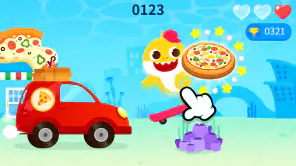
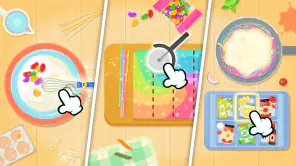
Baby Shark Pizza Game for Kids is a colorful, child-friendly cooking game based on the popular Baby Shark characters. Players can prepare pizzas by choosing ingredients, adding toppings, and completing simple kitchen activities. The game is designed mainly for young children, with easy controls, bright animations, and playful sounds that make the cooking process entertaining without requiring advanced gaming skills.
Is Baby Shark Pizza Game suitable for young children?
The game is generally aimed at preschool and early-school-age children because its activities are simple and its interface is easy to understand. Children can usually play by tapping, dragging, and selecting ingredients. Parents should still check the recommended age rating, language options, advertisements, and available in-app purchases before allowing a child to play independently.
Does Baby Shark Pizza Game require an internet connection?
Some parts of Baby Shark Pizza Game may work without a permanent internet connection after installation, which can be convenient for travel or limited data use. However, internet access may be required for downloading the game, displaying advertisements, restoring purchases, or receiving updates. Because offline functionality can vary by device and version, it is best to test the game before relying on it offline.
Are there advertisements or in-app purchases in the game?
The availability of advertisements and optional purchases depends on the version downloaded and the platform where it is installed. Children’s games may include promotional content, extra items, or features that can be unlocked through purchases. Parents should review the store listing and configure parental controls or purchase authentication to prevent accidental spending while the child is playing.
Is Baby Shark Pizza Game educational or only for entertainment?
Baby Shark Pizza Game is primarily an entertainment experience, but it can also encourage basic skills such as hand-eye coordination, following sequences, recognizing colors, and making simple choices. It should not be considered a complete educational tool or a substitute for real cooking supervision. Parents can make the experience more meaningful by discussing ingredients and healthy food choices while playing together.
Pros
- Simple touch controls are suitable for preschoolers.
- Bright animations and familiar characters keep young players engaged.
- Pizza-making activities encourage basic hand-eye coordination.
- Short play sessions work well for limited attention spans.
- Offline play is convenient for travel or areas without internet.
Cons
- Gameplay may become repetitive after several sessions.
- Some children may find the sound effects overly loud or frequent.
- Limited challenge means older kids could lose interest quickly.
- In-app purchases may require parental supervision.
- The game can take up noticeable storage space on some devices.